161 views
owned this note
# Redesigning the Hausmania network
Hackeriet serves as the ISP for all of Hausmania. This is carried by three access switches:
- haus-core-sw2 <sup>[ [IPAM](https://ip.hackeriet.no/dcim/devices/78/) | [NMS](https://nms.hackeriet.no/device/20) ]</sup>
- hackeriet-sw <sup>[ [IPAM](https://ip.hackeriet.no/dcim/devices/41/) | [NMS](https://nms.hackeriet.no/device/5) ]</sup>
- sw-bassgangen <sup>[ [IPAM](https://ip.hackeriet.no/dcim/devices/59/) | [NMS](https://nms.hackeriet.no/device/13) ]</sup>
Everything after this is a ratsnest prone to rogue DHCP servers, custom Wi-Fi access points, and other issues. Since people prop up their own unmanaged switches, enabling DHCP guard etc. today risks bringing down the network.
Some of the downlinks we have into Hausmania runs on cables that seem to be damaged, if we even know where they terminate.
We want to:
1. Add more access switches closer to users
2. Drag new, redundant cables for all these switches
## How?
We'll expand up from the basement, replacing "dumb" equipment found along the way.
A crude summary of _known_ current state is described in:
- Netbox (ip.hackeriet.no)
- Netmap (hackeriet.no/netmap)
- Net debug pad https://pad.hackeriet.no/net-debug
:::info
**New to networking?**
Do some initial research on these buzzwords before the workshop, either locally in the hackerspace during meeting days or online whenever you want!
<br />
<em><small>
VLAN/802.11q and "tagged/untagged", (Rapid) Spanning Tree Protocol/STP/PVST, DHCP guard/snooping, LACP/LAG/Bond/802.3ad
</small></em>
:::
### Workflow
Switch configuration is easy, but the physical work of testing and tracing cables, mounting switches, stretching and terminating cables etc. can be tedious when you're working alone.
We'll set up work sessions on an irregular basis, and see how much of the design implementation we can get done for each session.
Make sure to mark your attendance on Mobilizon events!
### Configuration
Netbox can largely provide us with full config for all switches. Some template changes may be needed to take proper care of specific features or for bootstrap ergonomy reasons.
The following is taken care of today by the template:
- VLANs and interface state
- Radius (Hacker-ID) and local user accounts
- Management interface, syslog, SNMP & NTP
- SSH & serial config
- DHCP snooping
- LLDP
### Hardware
We have a stash of Cisco switches in house, and are very likely to find more switches without much work nor cost. No PoE however.
We have a stack of Unifi APs somewhere but they seem to have been relocated. Might need some digging, and we might need new ones. Wi-Fi isn't part of the immediate scope but we should replace APs if possible.
### Other
Someone needs to look at 3D printing rack ear wallmounts, similar to the ones we've used for Bassgangen. We probably need to acquire matching screws as well.
## Planning workshop
Event: https://events.hackeriet.no/events/b84305d7-3807-4c2c-9a4e-99578a6254b6
The focus for this project is "Bygg A" - The part of Hausmania where Hackeriet, Podium, Kontoret, and Kafé Hærverk resides.
We'll iterate over the [netmap](https://hackeriet.no/netmap) and discuss:
- Where are there conduits today?
- Where do we want switches?
- Where do we want links?
- What about redundancy?
- Do we need to make any considerations given today's existing configuration to get things right?
Assume funds are not an issue: We are designing the dream scenario. Whether it is doable or not is a problem for the future.
Finally we'll schedule a work session and maybe get a kick-start on the work by configuring some switches.
### Discussion phase
- We want 2 cables - 1 for the "toilet" stairs and 1 for the podium stairs
- We have 4 SFP slots per switch: Utilizing this for trunks may discourage messing around.
- Equipment
- Aleksi found lockable RJ45 port/cable guards on Ali Express
- Jannis found 3d printable options: [Standard](https://www.printables.com/model/374665-rj45-ethernet-cable-lock), ["Do not remove"](https://www.printables.com/model/1069792-ethernet-cable-lock-for-all-scenarios)
- Aleksi also found a cable marking solution
- Jannis found 3d printable ethernet [cable routers/holders](https://www.thingiverse.com/thing:1320948)
- Switch marking
- At least hackeriet stickers
- Some sort of poster with information. What info? QR code?
- Some sort of information letter/webpage with basic tenant info (low-tech support)
- Still uncertainty on how much shadow infra there is
- Found an entirely new networking conduit box in 2nd floor, by Hærverk stairs
- Large parts of the area above Hærverk is off-limits for us
- Minimum 1 switch per floor
- 4th floor: 1 switch in the middle (but different place) might be enough. Rest can maybe be solved with APs
- 3rd floor: 1 switch. Might be able to fit it in the existing conduit box, hidden over the power socket. Needs custom harness or something
- 2nd floor: 2 switches: one switch per AP area
- 1st floor + U0: Currently out of scope.
- Might do something with the staircase behind Hærverk/Office.
- Should contact Hærverk/Office/Byggtek to discuss needs in the area.
- Should consider a switch beneath the entrance in U0 in order to facilitate electrical door lock.
- 22:30 curveball: Podium has a broken cable to server room and needs WiFi for an event
- "Hostile" activities:
- Switch painting - 3rd floor has been repainted at some point and houses painters. We may need to account for them "redecorating" switches
- Re-plugging cables, moving etc.
- Questions:
- Can we put in conduits?
- Fire safety? Do we need to use LSZH cables?
- Need to screen recabling plans with Byggtek
- Immediate plan:
1. Replace 3rd floor switch
2. Plan more around cables, send Byggtek inquiry for feedback on project/suggestions + cabling needs
3. Do the rest
## Configuring devices
"Render config" in Netbox should sort out _most_ of the intricacies (although things may need to be applied out-of-order).
This section contains details on how a device must look in Netbox before the configuration can be applied.
### Basic configuration process
1. Create a new device
- Device type: `<switch model>`
- Configuration template: Cisco
2. Create virtual interface named `Vlan32`
3. Assign IP address to `Vlan32` by creating new addresses on the relevant prefixes ([Netbox](https://ip.hackeriet.no/ipam/vlans/25/))
4. Define trunk ports (upstreams/downstreams)
- 802.1Q mode: Tagged
- Tagged VLANs: As needed (usually 3, 10, 32)
- Set tags as listed in [DHCP guard/snooping](#DHCP-guardsnooping)
5. Add device tag "DHCP Guard"
6. Mark all remaining ports as access ports
- 802.1Q mode: Access
- Untagged VLANs: 10 (for hausmania) or 3 (for hackeriet)
7. Apply config
### SSH config
```
Host 10.10.* *.hackeriet.no
PubkeyAuthentication yes
User <hackerid>
PubkeyAcceptedAlgorithms +ssh-rsa
HostKeyAlgorithms +ssh-rsa
PubkeyAcceptedKeyTypes +ssh-rsa
KexAlgorithms +diffie-hellman-group1-sha1,diffie-hellman-group14-sha1
Ciphers +aes256-cbc
```
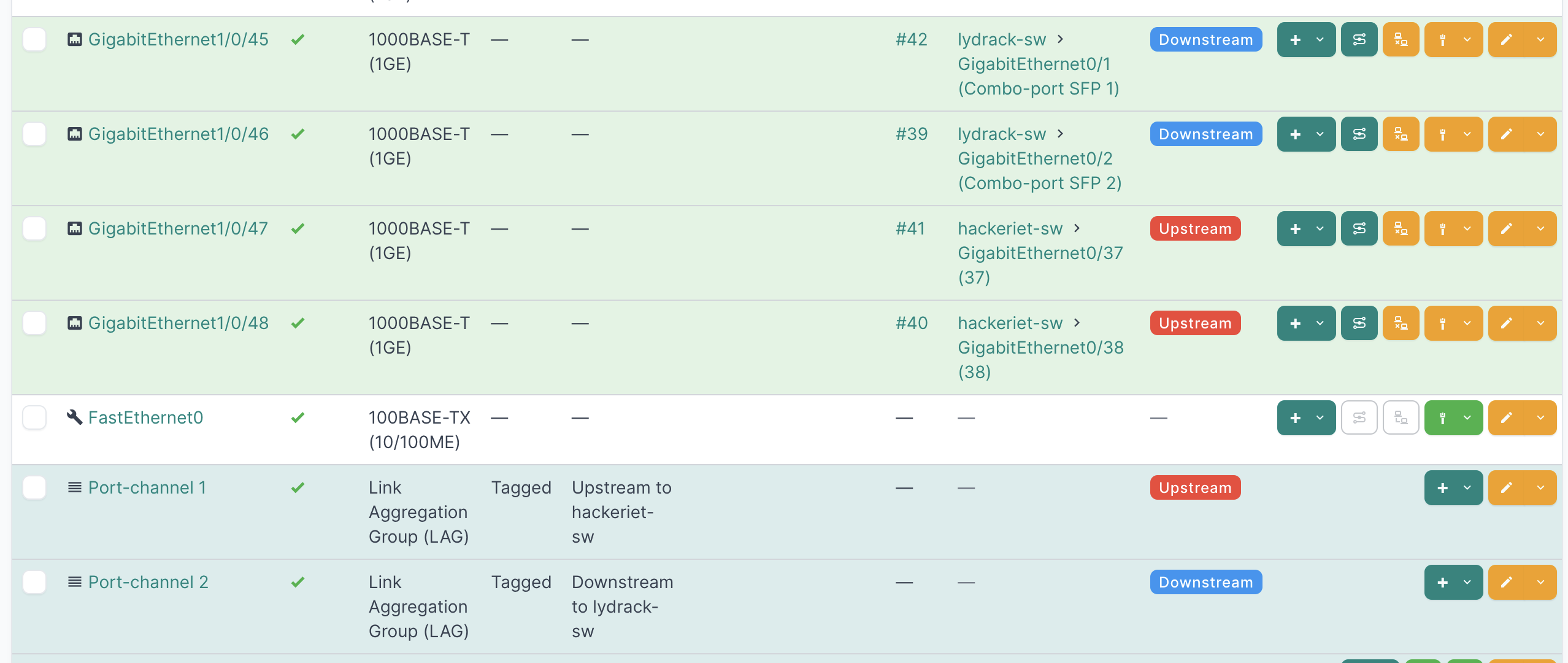
### DHCP guard/snooping
Configure this on a device by:
1. Adding the "DHCP Guard" tag to the device
2. Adding the "Upstream" tag to any trunks leading to the DHCP server
3. Adding the "Downstream" tag to any trunks leaving this switch
The current DHCP guard solution only supports trusting trunk ports. Access ports are untrusted by default. Any VLANs tagged in Netbox with "DHCP Guard" will now be enabled for DHCP guard on the switch.
## Execution
### 3rd floor
Event: https://events.hackeriet.no/events/3ff5d1ce-6281-4e9a-b922-f2f555b20aeb
To-do (in no particular order):
- Configure a switch (what naming standard?)
- Test fit in 3rd floor
- Trace cables; find the upstream
- Make a harness/mount
Bonus: New cable for Podium?
https://ip.hackeriet.no/dcim/interfaces/463/
https://ip.hackeriet.no/dcim/interfaces/465/